
Introduction to the ghqc workflow
The ghqc ecosystem was designed to foster an iterative, communicative way of working for authors and QCers to complete a QC.
In this section, we will detail some of the terminology we utilize and discuss the ghqc ecosystem workflow.
Terminology
Section titled “Terminology”ghqc uses GitHub Issues and Milestones as the hub for the QC process.
GitHub Issues
Section titled “GitHub Issues”Issues serve as the core unit of the QC. When a file is initialized for QC, an issue is created and named after the file.
GitHub Issues provides features “out of the box” that can directly aid a QC:
- Assignees - This feature allows authors to assign a reviewer to their script, or a reviewer can assign themselves. This provides great organizational benefit to show who has ownership of the review.
- Comments - This feature provides an intuitive way for reviewers and authors to communicate, with the additional benefit of improved traceability.
- Interactivity - GitHub Issues provide an interactive, markdown style comment body, which allows reviewers to easily check off review items, while giving organizations comfort all actions are traceable.
- Milestones - This feature allows authors to organize their issues. This will be discussed in further detail below.
In addition to utilizing the features GitHub Issues provide by default, ghqc adds additional metadata about the file of interest.
When a file is assigned for QC, a Metadata section is added to the initial body, containing information for the reviewer to set-up
their repository and for traceability.
GitHub Milestones
Section titled “GitHub Milestones”Milestones serve as the organizational unit of the QC. Milestones group related issues under common goals or timelines, such as a project phase.
This organization provides users with simple, flexible ways to progress through the lifetime of a project. It additionally provides a summary of how a QC for the milestone is proceeding.
Workflow Overview
Section titled “Workflow Overview”The ghqc ecosystem uses a 3 phase workflow for each file to be QCed:
- Initialize - A QC is initialized upon the creation of a GitHub Issue through the
ghqcassign app. It contains metadata around the file at initialization and checklist items which the QCer should review the file for. - Review - After initialization, review occurs.
ghqcpromotes an iterative and interactive method by allowing the QCers to comment within the Issue and the author to reply back with a file difference, highlighting the changes, using theghqcnotify app. - Approval - After the QCer has reviewed the file and has all of their feedback addressed, the Issue can be approved and closed through the
ghqcstatus app.
After QC the author can create an exportable record of what occurred within GitHub.
This is visualized below:
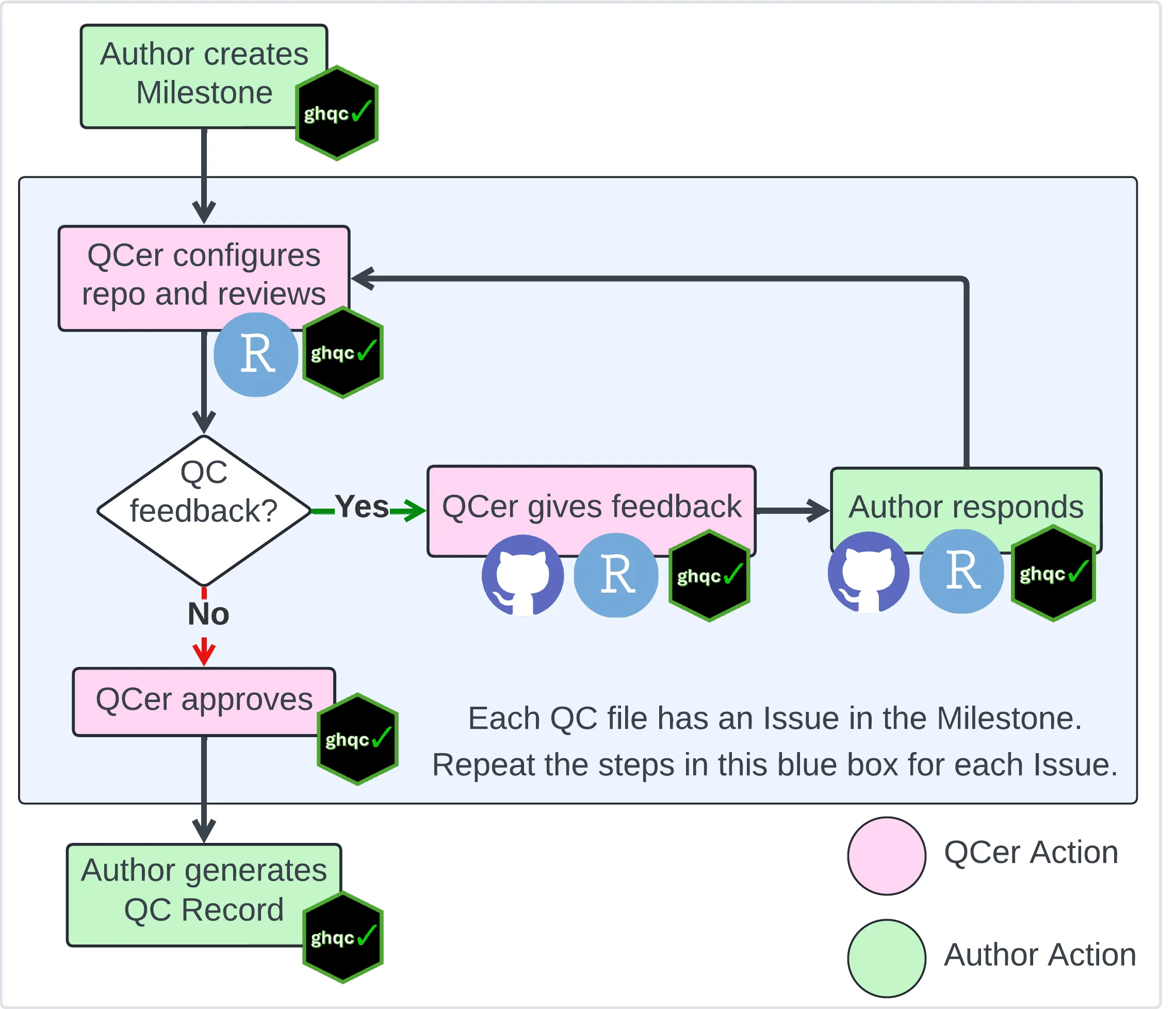
On the following pages, we will go into detail of how ghqc aids users to work through the QC workflow for a file, from how the author creates a milestone populated with issues to approval.