Adding an alerter to nmm
nmm offers additional notification features over bbi. You can get messages about parameters or gradients hitting zero. nmm will log these messages, but you can also point nmm to a program that can send messages. We’ll start by using curl and sending these messages to ntfy.sh .
Prerequisites
nmminstalled- Familiarity with generating
nmmconfig files - Familiarity with using ntfy.sh for alerts
Updating nmm config with alerter_opts
Because the alerter feature is built into nmm we only need to update the nmm config file and can use the same nmm template file as before.
#!/bin/bash#SBATCH --job-name="{{job_name}}"#SBATCH --nodes=1#SBATCH --ntasks=1#SBATCH --cpus-per-task={{ncpu}}#SBATCH --partition={{partition}}#SBATCH --account={{project_name}}
{{nmm_exe_path}} -c {{config_toml_path}} run
We’ll make use of alerter_opts argument for adding an alerter to the nmm config file. To send a message to ntfy.sh we use the following command:
curl -d "Backup successful 😀" ntfy.sh/mytopicnmm will send a message using:
{{alerter}} {{command}} -{{message_flag}} "<message from nmm>"alerter will be the path to the curl binary, the command will be ntfy.sh/mytopic and the message_flag will be d and nmm will inject various messages. We will supply this information in our call to generate_nmm_config.
library(slurmtools)library(bbr)
mod <- bbr::read_model(file.path("cluster-data", "user-homes", "user","slurmtools","model","nonmem", "1001"))generaate_nmm_config(  mod,  watched_dir = "/cluster-data/user-homes/user/slurmtools/model/nonmem",  output_dir = "/cluster-data/user-homes/user/slurmtools/model/nonmem/in_progress",  alerter_opts = list(    alerter = Sys.which("curl"),    command = "ntfy.sh/slurmtools_example_ntfy",    message_flag = "d"  ))
This function call will generate a 1001.toml file with the following contents
model_number = '1001'watched_dir = '/cluster-data/user-homes/user/slurmtools/model/nonmem'output_dir = '/cluster-data/user-homes/user/slurmtools/model/nonmem/in_progress'
[alerter]alerter = '/usr/bin/curl'command = 'ntfy.sh/NONMEMmonitor'message_flag = 'd'
Alerts with nmm
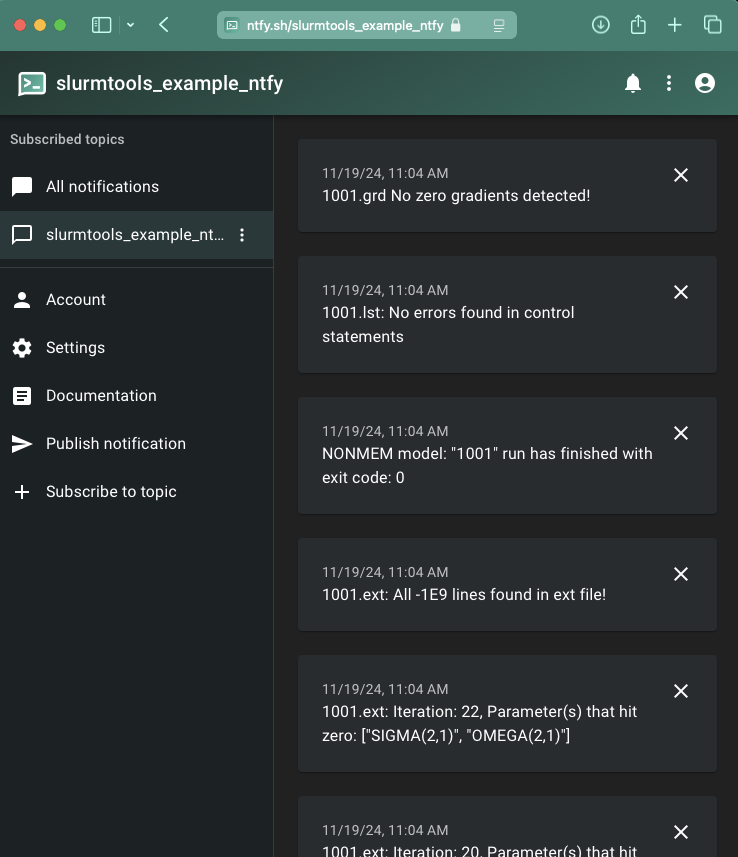
We can now call submit_slurm_job as usual and we will see several messages sent to ntfy.sh